Key takeaways
- Multi-modal complex detection combines video, equipment state and site data, and alerts only when the combination adds up to risk.
- Having trained personnel verifying live alerts cuts false alarms and keeps accountability with people.
- Run a proof of concept on your own cameras with written success criteria. Demos run on curated footage. A PoC runs on your site.
- Be upfront about your internal capacity to manage an AI detection or computer vision system. Deployment includes camera-vendor coordination, edge hardware, model upkeep and monitoring.
- Hold every vendor to the same RFP questions, and let the PoC readout decide the award.
What is AI detection for workplace safety?
AI detection uses computer vision and other site data to recognize unsafe conditions and behaviors as they happen, then alerts the right person while there is still time to act. It runs on existing cameras in most cases, and works best with a human reviewer between the model and the floor.
Most sites already have cameras. Few are watched in real time, and almost none of the footage is used until after something goes wrong. AI detection reads that video, along with other operational data, and turns it into timely, accountable action. Every system worth buying runs some version of this loop:
Does AI detection need new cameras?
Usually not. Most modern IP cameras produce video good enough for detection when the angle, lighting and resolution suit the task. A vendor should assess your current cameras before proposing new ones, and justify any replacement camera by camera. The harder work sits around the cameras: placing edge hardware, securing network access, coordinating with your camera or VMS vendor, and calibrating zones.
Edge or cloud?
Models can run on edge devices at the site, in the cloud, or both. Edge processing keeps latency low and limits how much raw video leaves the site. Cloud processing makes central updates and cross-site analytics easier. Ask any vendor which parts run where, and why.
What is multi-modal complex detection?
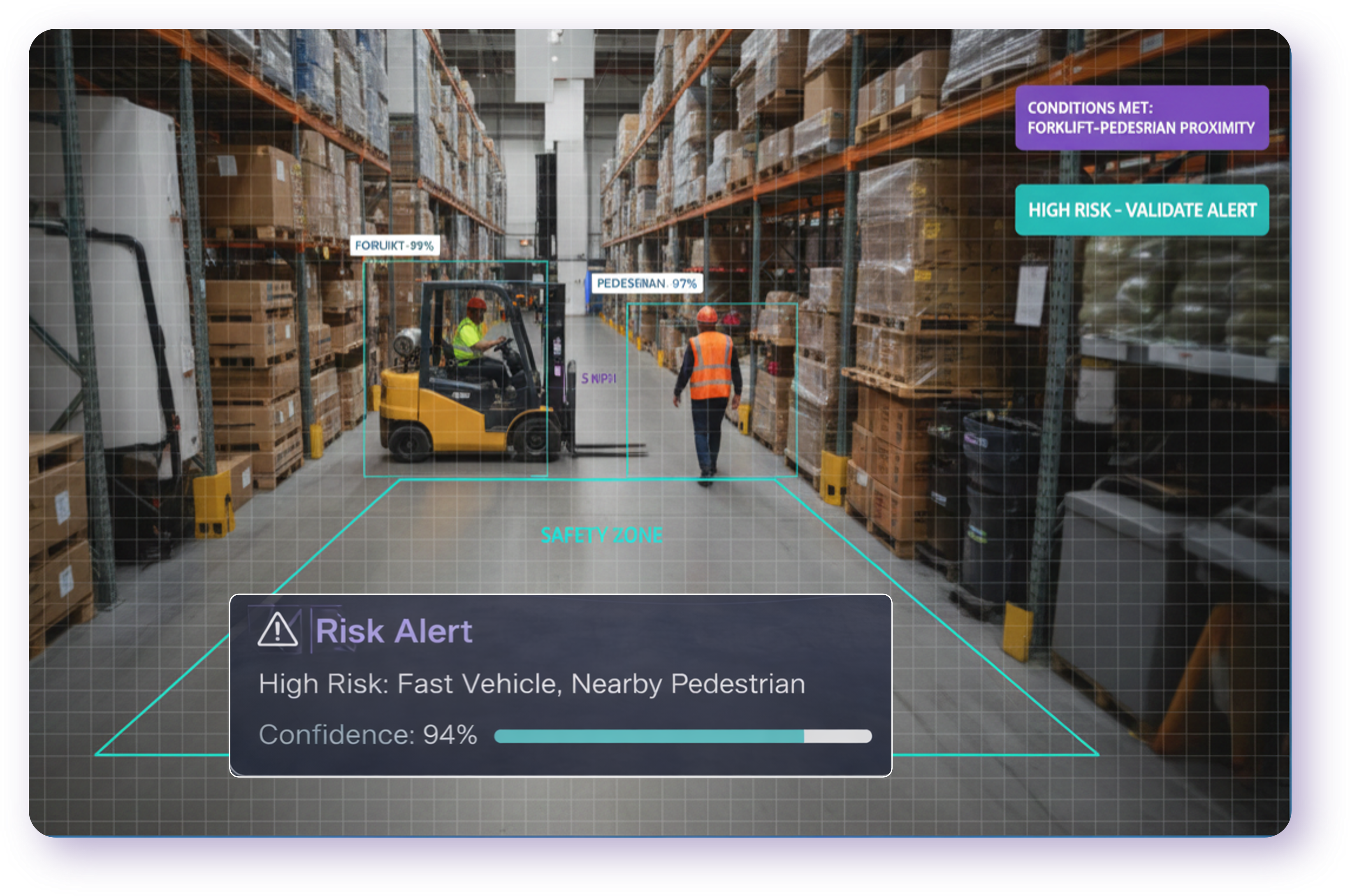
Complex detection evaluates several conditions together, across time and space, and alerts only when the combination signals real risk. Multi-modal means the inputs go beyond video to include equipment state, sensors, wearables and records from systems such as WMS, CMMS, permit-to-work or EHR.
Early computer vision answered one question about one frame. That is the source of most alert fatigue. A worker without a hard hat in a break room is not a risk. A worker without one beside a running overhead crane is. Real incidents come from combinations, so detection has to understand combinations too.
Inputs a multi-modal system can combine
- Video from fixed, PTZ, body-worn or vehicle cameras.
- Equipment and machine state such as PLC signals, forklift telematics or lockout status.
- Operational systems such as WMS, MES, CMMS, permit-to-work or EHR records.
- Connected devices and wearables such as proximity tags, gas monitors or lone-worker devices.
- Environmental sensors for temperature, noise, gas or air quality.
How to test a vendor's claim
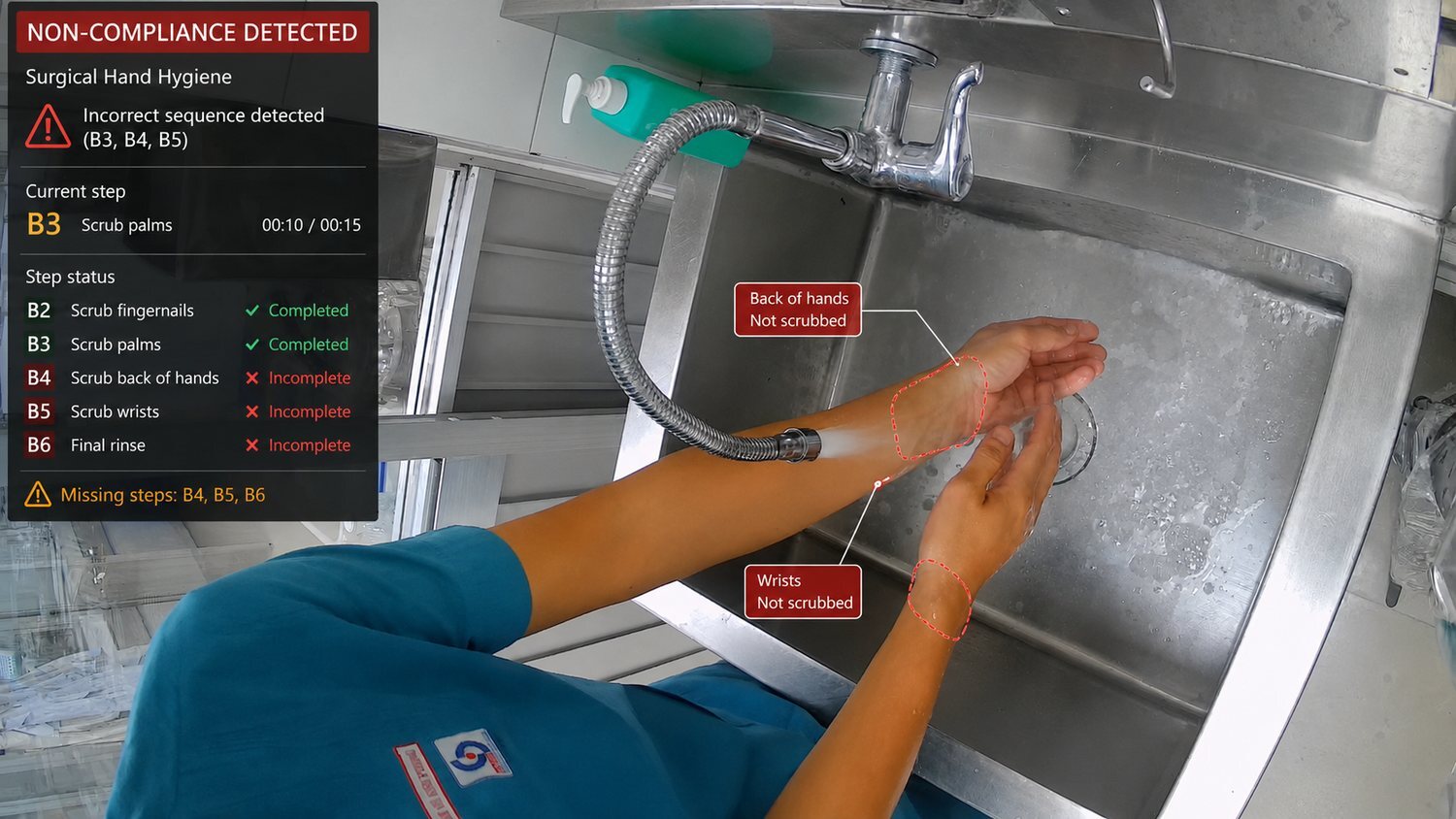
Ask them to build one of your scenarios live: how a rule combines conditions, how timing and sequence work (for example, "hand hygiene within 30 seconds before patient contact"), and whether your team can adjust the combination. A system limited to single-object detection will send more alerts and fewer useful ones.
Which safety and operations use cases fit AI detection?
The strongest fits are high-consequence hazards that happen in a predictable place: pedestrian and vehicle conflicts, exclusion zones, PPE for the task, lockout and permit steps, leaks and smoke, unauthorized access, and patient falls. Start with the one or two that cost the most when missed.
| Domain | What detection does |
|---|---|
| Personal safety | Task-appropriate PPE, exclusion zones, working at height, unsafe lifting, line-of-fire exposure. |
| Work execution and procedures | Lockout/tagout steps, permit conditions, required sequences, two-person rules. |
| Equipment and process integrity | Leaks, smoke, flame, blocked guards, spills, abnormal equipment states. |
| Vehicle and traffic movement | Forklift, truck and mobile-equipment interactions with people; speeding; right-of-way violations. |
| Security and access | Unauthorized entry, tailgating, after-hours activity in restricted areas. |
| Patient and resident safety | Falls, bed or room exits, hand-hygiene compliance, unattended high-risk situations. |
| Emergency preparedness | Early warning of fire, spills, falls and medical events; muster and headcount support. |
How do you measure AI detection accuracy?
Ask for precision (how many alerts were real) and recall (how many real events were caught) for each detection type, measured on your own footage. A single blended accuracy percentage tells you almost nothing. Track alert volume, latency and outcomes against a baseline too.
| Metric | What it tells you |
|---|---|
| Precision | Share of alerts that were real events. Low precision means alert fatigue. |
| Recall | Share of real events the system caught. Low recall means blind spots. |
| Alerts per camera per shift | The load your reviewers and supervisors will carry. |
| Detection latency | Seconds from event to alert. Matters most for live intervention. |
| Uptime and coverage | Share of planned cameras and integrations online and correctly positioned. |
| At-risk event rate | Verified events per 1,000 labor hours, by zone and shift, against baseline. |
How should thresholds be set?
Every model trades precision against recall. Set thresholds by consequence. Life-critical conditions warrant high sensitivity, especially when a human reviewer filters alerts before they reach the floor. Lower-risk detections can feed weekly trend reports instead of live alerts. Document each threshold, its reason, its approver and its last review, and treat changes like any other change to a safety control.
What does human in the loop mean for AI detection?
Human in the loop means a trained person reviews AI output before it leads to a consequential action. For live safety alerts, the recommended model is "verify, then alert": a reviewer confirms each event in seconds, then routes it to the right supervisor.
Here is what level 3 looks like on a live site. Pick an event to see the footage and the record that followed it.
- Detected
- Forklift exceeding safe travel speed
- Model confidence
- 95%
- Rule
- VEH-SPEED-01
- Routed to
- Operations supervisor
- Review status
- Human validated · Alert sent
- Detected
- Pedestrian-vehicle conflict: MHE within 3 metres
- Model confidence
- 97%
- Rule
- SAF-NEARMISS-01
- Routed to
- Safety manager
- Review status
- Human validated · Logged
- Detected
- Red-zone incursion: hazardous area entry
- Model confidence
- 97%
- Rule
- EWS-REDZONE-01
- Routed to
- Safety supervisor + site manager
- Review status
- Human validated · Escalated
Who should review alerts?
Your staff, the vendor's review team, or a mix, such as vendor reviewers overnight and site staff during the day. Vendor-provided review removes a staffing burden, but you should know who the reviewers are, how they're trained, what they can see and how fast they respond.
Alert load and review capacity
Estimate how many alerts your sites will generate and how much review time that takes. The starting values are examples. Replace them with your numbers or a vendor's PoC figures.
What good looks like
- A written review standard for each detection type.
- A committed review time, measured and reported.
- Every decision logged, including dismissals, with a reason.
- Dismissed alerts fed back into model improvement.
- A clear way for workers to see and question what was recorded about them.
How do you run an AI detection proof of concept?
Run a limited, time-boxed deployment at one site, on your existing cameras, measured against success criteria agreed in writing before it starts. Use a shadow period to tune, a live period to measure, and a readout that ends in a decision: scale, adjust or stop.
- Set the scope. One site, a defined set of cameras and zones, two to four detection types.
- Capture a baseline. Current event rates, response times and incident data before go-live.
- Write the success criteria. Minimum precision and recall per detection type, maximum alerts per shift, review time and the outcome change you expect.
- Agree human review. Who verifies alerts during the PoC, and how quickly.
- Run a shadow period. Detections run and are reviewed, but no alerts reach the floor. Tune zones and thresholds.
- Go live. Verified alerts reach supervisors under agreed procedures. Track every alert to closure.
- Read out and decide. Results against each criterion, raw data available to your team, decision recorded.

Look past the pilotAsk how the PoC setup carries into production. Hardware, zones, rules and integrations built for the PoC should become the template for every site after it.
Agree exit terms up front too: what happens to hardware, data and footage if you don't proceed.
Proof-of-concept success criteria
Set your pass marks before the PoC starts. At readout, enter the results and the scorecard suggests a decision. Rows show example detection types; rename or clear them.
| Detection type | Pass mark (agree up front) | Readout result | Status | ||||
|---|---|---|---|---|---|---|---|
| Min precision % | Min recall % | Max alerts / shift | Precision % | Recall % | Alerts / shift | ||
Enter readout results to see a suggested decision. Leadership makes the call.
Should you choose self-managed or managed AI detection deployment?
Choose managed if your team lacks spare IT, field-technician or data-science capacity. A managed provider coordinates with your camera vendors, installs and configures edge hardware, runs the AI inference layer and monitors performance. Your team keeps response, coaching and root-cause work.
Buying the software is the easy part. Running it takes ongoing work. The question is who does it.
| Task | Self-managed | Managed service |
|---|---|---|
| Camera assessment | Your team | Provider |
| Camera and VMS vendor coordination | Your team | Provider |
| Edge hardware install and configuration | Your team | Provider |
| Zone and rule configuration | Your team | Provider, approved by you |
| Inference layer and model updates | Shared | Provider |
| Alert verification | Your team | Provider or shared |
| Performance and drift monitoring | Your team | Provider, reported to you |
| Response, coaching, corrective action | Your team | Your team |
How a managed service lightens the load
Most operations and safety teams don't have spare people to install hardware across sites, chase camera integrators or notice when a model starts drifting. A managed service moves that work to a provider whose job is to keep detections accurate and hardware online. You can see what a managed deployment covers on the Rainscales deployment page.
The trade-off is dependence on the provider. Manage it in the contract: clear service levels, reporting you can verify, data ownership, and exit terms that leave you with your data and a working handover.
Signs a managed model fits
- Your IT team supports many sites and can't commit field time to installs.
- Cameras come from several manufacturers or integrators.
- You need detections running in weeks, not after a long internal project.
- No one on staff owns model accuracy or would notice drift.
- You want alerts verified around the clock without hiring reviewers.
Which deployment model fits your team?
Answer six questions about your team and sites. The result updates as you go.
The AI model development pipeline: what it really takes
Every reliable computer vision deployment runs on a continuous eight-stage cycle: define, collect, annotate, curate, train, evaluate, deploy and monitor. Each stage needs specialized people, tools and time, and the cycle never stops, because models drift as sites, seasons and equipment change.
- 1
Define the rule
Turn safety policy into visual criteria a model can detect, with edge cases and acceptance targets written down.
RequiresCV solutions architect, safety domain expertise
- 2
Collect data
Gather footage from your actual cameras across every shift, lighting condition, weather and season.
RequiresField engineering, data pipeline infrastructure
- 3
Annotate
Label thousands of frames to a consistent written standard, with quality review.
RequiresTrained annotators, labeling tools, QA reviewers
- 4
Curate
Remove duplicates, balance the dataset and protect a held-out test set.
RequiresML engineers, data management discipline
- 5
Train and fine-tune
Retrain models on GPU infrastructure, starting from a production baseline.
RequiresML engineers, GPU compute
- 6
Evaluate
Prove the new model cuts false alarms without missing real events, then shadow-test it live.
RequiresML evaluation expertise, pilot-site coordination
- 7
Deploy to the edge
Optimize the model for edge hardware and roll it out in stages, with rollback.
RequiresEdge and embedded engineers, over-the-air update infrastructure
- 8
Monitor and retrain
Track accuracy per camera, catch drift, review rejected alerts, then start the cycle again.
Requires24/7 review staff, analytics, ongoing engineering
Stage 8 feeds straight back into stage 2. The pipeline is a loop you run for as long as the system is live.
Doing it yourself means building and keeping
- A team spanning ML engineering, data annotation, edge engineering and event review
- GPU compute, labeling tools and deployment infrastructure
- Months of ramp-up before the first reliable model
- Permanent ownership, because models drift as sites, seasons and equipment change
With a managed service, you get
- The full pipeline, team and infrastructure from day one
- Models already trained across many sites, so you start further ahead
- Human-reviewed events, so your team sees fewer false alarms
- Continuous improvement you can measure, without adding headcount
You focus on acting on safety events. The provider handles what it takes to make them accurate.
What should an AI detection RFP include?
A short site brief, then questions in ten areas: company experience, detection capability, accuracy, human review, proof of concept, deployment model, integration, data and security, support, and commercials. Agree scoring weights before responses arrive, and let the PoC readout decide the award.
Use the builder to pick the questions that fit your project and copy them into your RFP.
Build your RFP question list
Fill in your site brief, open each area and untick any questions that don't apply. The strong-answer notes are for your evaluators and are left out of the copy. Copy the result into your RFP document.
ACompany and experience
- Specific examples with site type, scope and duration, plus references you can call.
- A candid example with the fix and what it taught them.
BDetection capability
- A live walkthrough combining video, zones, timing and other data for your use case.
- Named production integrations for equipment state, sensors, wearables or system records.
- Self-service with an audit log, or a defined change process with turnaround times.
CAccuracy and validation
- Per-type figures with dataset, conditions and method. No single blended number.
- Scheduled re-testing, monitoring triggers and regular reporting.
DHuman in the loop
- Verification by default, with any exceptions named and justified.
- A named, trained team, a written review standard and a measured service level.
EProof of concept
- A written plan tied to your use cases, on your existing cameras, with a shadow period.
- Clear removal and deletion terms, confirmed in writing.
FDeployment and managed services
- Every task answered in writing, from camera assessment to drift monitoring.
- Named roles, a described process and site safety induction for installers.
GIntegration and reporting
- Named production integrations plus an open API.
- Yes, in common formats, at any time.
HData, privacy and security
- No, or only with your written opt-in.
- You do, stated in the contract.
ISupport and service levels
- Numbers in the contract, with credits for misses.
JCommercials
- Inclusions and exclusions listed line by line, including hardware and services.
- Reasonable term, no auto-renewal surprises, data handover on exit.
Red flags in vendor responses
- Accuracy quoted as one percentage with no detection type, dataset or method.
- No structured PoC, or a PoC without written success criteria.
- "Works with any camera" without assessing yours.
- No human review option, or review that is undefined.
- Vague answers on data ownership, training on your footage or exit terms.
Score the responses
Vendor scoring sheet
Set the weights that match your priorities before responses arrive, then score each vendor 1 (weak) to 5 (strong) per area. Weights are scaled to 100% automatically. Score commercials separately.
Swipe the table sideways to score each vendor.
| Area | Weight | |||
|---|---|---|---|---|
| Weighted score (out of 5) | 100% | – | – | – |
Score every area for at least one vendor to see a ranking.
What privacy, security and legal checks does AI detection need?
Collect only what each use case needs, blur identities where they aren't required, tell the workforce what is monitored and why, require encryption and role-based access, and have counsel review monitoring, biometric, sector and AI-specific rules before go-live.
- Privacy by design. Limit retention, restrict who can view footage, and never repurpose safety data for productivity scoring without telling the workforce first.
- Transparency. Post signage, brief every shift, share aggregate results, and involve worker representatives early.
- Security. Encryption in transit and at rest, role-based access, audit logs, segmented networks for edge devices, and vendor evidence such as ISO/IEC 27001 or SOC 2 Type II.
- Legal review. Workplace monitoring and notice rules; biometric and privacy laws such as GDPR and Illinois BIPA; sector rules such as OSHA, HIPAA and FMCSA; the EU AI Act; records retention.
- Governance frameworks. The NIST AI Risk Management Framework and ISO/IEC 42001 give AI governance a structure. ISO 45001 remains the reference for the wider safety management system.
Before go-live, answer five questions in writing: what is monitored, why, who sees it, how long it is kept, and how a worker can raise a concern.
What does AI detection look like in different industries?
The framework is the same everywhere. What changes is the hazard, the regulator and the vocabulary. Below are complex-detection examples and the regulatory anchors teams usually start from.
A forklift-to-forklift near miss at a dock, validated within a minute, assigned to operations and resolved.
A patient sitting at the bed edge in a med-surg room, validated and sent to the nurse, who repositioned the patient.
Workers at height without a harness on a tower floor, validated and sent to the site foreman.
A crane lift outside its permitted window on an offshore platform, validated and sent to HSE before the permit was reissued.
A surface defect cluster on a production line, validated by QC, sent to the line lead and contained.
Footage: Rainscales| Industry | Complex detection examples | Common anchors |
|---|---|---|
| Warehouse and logistics | Pedestrian in walkway while a forklift approaches; dock door open with no trailer; mobile equipment speeding in a congested aisle. | OSHA 1910.178 powered industrial trucks; FMCSA |
| Manufacturing | Person inside a robot or press cell while energized; guard open during operation; lockout steps out of sequence. | OSHA 1910.147 and 1910.212; ISO 45001 |
| Healthcare | Hand hygiene missed before patient contact; high-fall-risk patient exiting bed unattended. | HIPAA; Joint Commission; CMS Conditions of Participation |
| Oil and gas, energy, chemicals | Person in a line-of-fire zone during a lift; work in a permit area without an active permit; vapor near an ignition source. | OSHA 1910.119 PSM; EPA RMP; IOGP Life-Saving Rules |
| Construction | Worker near an unprotected edge without tie-off; person in an excavator's swing radius. | OSHA 29 CFR 1926, Subpart M |
Frequently asked questions
What is the difference between computer vision and AI detection?
Computer vision is the technology that interprets images and video. AI detection is the full system built around it: cameras and other inputs, models, business rules, human review and integrations that turn what the model sees into an alert, an action and a record.
Can AI detection use our existing security cameras?
In most cases, yes. Modern IP cameras usually produce video good enough for detection when the angle, lighting and resolution suit the task. Ask vendors to assess your cameras first and to justify any replacement camera by camera.
What is multi-modal complex detection?
It is detection that combines several conditions, such as a person in a walkway, an approaching forklift and no spotter, across video and other data sources like equipment state, sensors and system records. It alerts on the combination, which cuts false alarms compared with single-object detection.
Why does human in the loop matter for AI safety alerts?
A trained reviewer confirms each event before it reaches supervisors. That removes most false alarms, keeps people accountable for safety decisions and protects workforce trust in the program.
How long should an AI detection proof of concept run?
Long enough to cover every shift pattern and typical volume swings at the site, including a shadow period for tuning before live alerts. Agree the length, scope and success criteria in writing before it starts.
What does a managed AI detection deployment include?
Typically camera assessment, coordination with camera and VMS vendors, edge hardware installation and configuration, management of the AI inference layer, alert verification options and ongoing performance and drift monitoring. Confirm each task in writing.
How do you compare AI detection vendors fairly?
Send every vendor the same RFP questions, agree scoring weights before responses arrive, score commercials separately, and shortlist two for a proof of concept on your own site. Let the PoC readout decide the award.
Is AI detection legal in the workplace?
It can be, but rules vary by country, state and sector. Have counsel review workplace monitoring and notice rules, biometric and privacy laws such as GDPR and Illinois BIPA, sector rules, the EU AI Act where relevant, and records retention before go-live.
Glossary
- Complex detection
- An event defined by several conditions together, across time, space or data sources.
- Computer vision
- AI that interprets images and video to recognize people, objects, actions and conditions.
- Edge device
- Computing hardware at the site that runs AI models close to the cameras.
- Human in the loop
- A trained person reviews AI output before it leads to a consequential action.
- Inference layer
- The software and hardware that run trained models on live data.
- Managed service
- The provider installs, operates and monitors the system for the customer.
- Model drift
- Accuracy declining as site conditions change from the data a model learned from.
- Multi-modal
- Using more than one type of input, such as video, sensors and system records.
- Precision / recall
- Share of alerts that were real / share of real events detected.
- Proof of concept (PoC)
- A limited, time-boxed deployment measured against agreed criteria.
- Shadow period
- Detections run and are reviewed, but no alerts reach the floor, for tuning.
- VMS
- Video management system: the software that records and manages camera feeds.